CSS Cascading Style Sheets

Stylesheets sind Formatierungsdateien einer Webseite. Sie werden meist im Header durch folgenden Tag zugeordnet:

<link rel="stylesheet" href="stylesheet.css">

In der Datei befinden sich CSS Ausdrücke in der Form:

h1 {color:#ffff00; ...:....}

Vorne stehen sogenannte Selektoren (hier h1, der Name des Tags im HTML Text) die angeben auf welche Bereiche sich die Formatanweisungen (color:#ffff00; ….) beziehen.

Die folgenden Selektoren werden oft verwendet:

  • .xyz bezieht sich auf einen Tag mit dem Parameter class=“xyz“
  • #xyz bezieht sich auf einen Tag mit dem Parameter id=“xyz“

Eine gute, ausführliche Beschreibung finden Sie auf den “Selfhtml” – Seiten.

Die Spezifikation vom W3C

Auf den Unterseiten finden Sie einfache Anwendungsbeispiele zu den wichtigsten Themenbereichen.

Farben

color: red | #f00 | #ff0000 | rgb(255,0,0) | rgb(100%,0,0)

background-color: red | #f00 | #ff0000 | rgb(255,0,0) | rgb(100%,0,0)

background-imge: url(bild.gif)

background-repeat: repeat | repeat-x | repeat-y | no-repeat

background-attachment: scroll | fixed

background-position: [top | center | bottom] [left | center | right]

background: color image repeat attachment position

Doku zum Thema bei selfhtml.org

Schriften

font-family: helvetica, arial

font-style: normal | italic | oblique

font-variant: normal | small-caps

font-weigth: normal | bold | bolder | lighter

font-size: 12pt | 12px | 1.5em | 150% | larger

font: style variant weight | size | family

Doku zum Thema bei selfhtml.org

Texte

word-spacing: normal | 1em

letter:spacing: normal | 0.1em

text-decoration: none | underline | overline | line-through | blink

vertical align: baseline | sub | super | top | text-top | middle | bottom | text-bottom | 10%

text-transform: capitalize | uppercase | lowercase | none

text-align: left | right | center | justify

text-indent: 3em | 10%

line-height: 1.2 | 1.2em | 120%

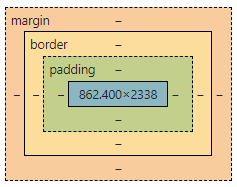
Ränder

width: 300px

height: 200px

float: left | right | none

clear: left | right both
Listen

liste-style-type: disc | circle | square | decimal | lower-roman | upper-roman | lower-alpha | upper-alpha

list-style-image: url(punkt.gif)

list-style-position: inside | outside

list-style: [disc | circle | square | decimal | lower-roman | upper-roman | lower-alpha | upper-alpha | none] || [inside | outside] || []

Effekte

a:link {…}

a:visited {…}

a:focus {…}

a:hover {…}

a:activ {…}

Doku zum Thema bei selfhtml.org